Monday morning, and the WHMCS queue filled up over the weekend: mail in spam, a certificate that did not renew, a suspended account. You connect WHMCS to AI to get that time back. Here is what changes for your team in the first month, without letting a bad reply reach a customer.
The rule: connect your live WHMCS, and keep Auto replies Off or in Shadow for the first weeks, however good the first drafts look. Your team still sends every reply. Konrado writes a draft for each ticket, and the drafts your team changes before sending show you what to fix before Konrado answers anyone on its own. Across every help desk connected to Konrado from August to October 2026, only about 3 in 10 drafts stayed close in meaning to what the team then sent (20,372 of 67,196). The other 7 in 10 needed a person’s hand first.
Week one: every ticket comes with a draft, and a person still sends it
From the day you connect, Konrado drafts every ticket in scope, and your team reads the draft in the browser extension, next to the WHMCS reply box. A draft reaches the customer only when someone inserts it and sends. For the team, the questions that repeat take less typing. For the customer, the reply still comes from a person who read it.
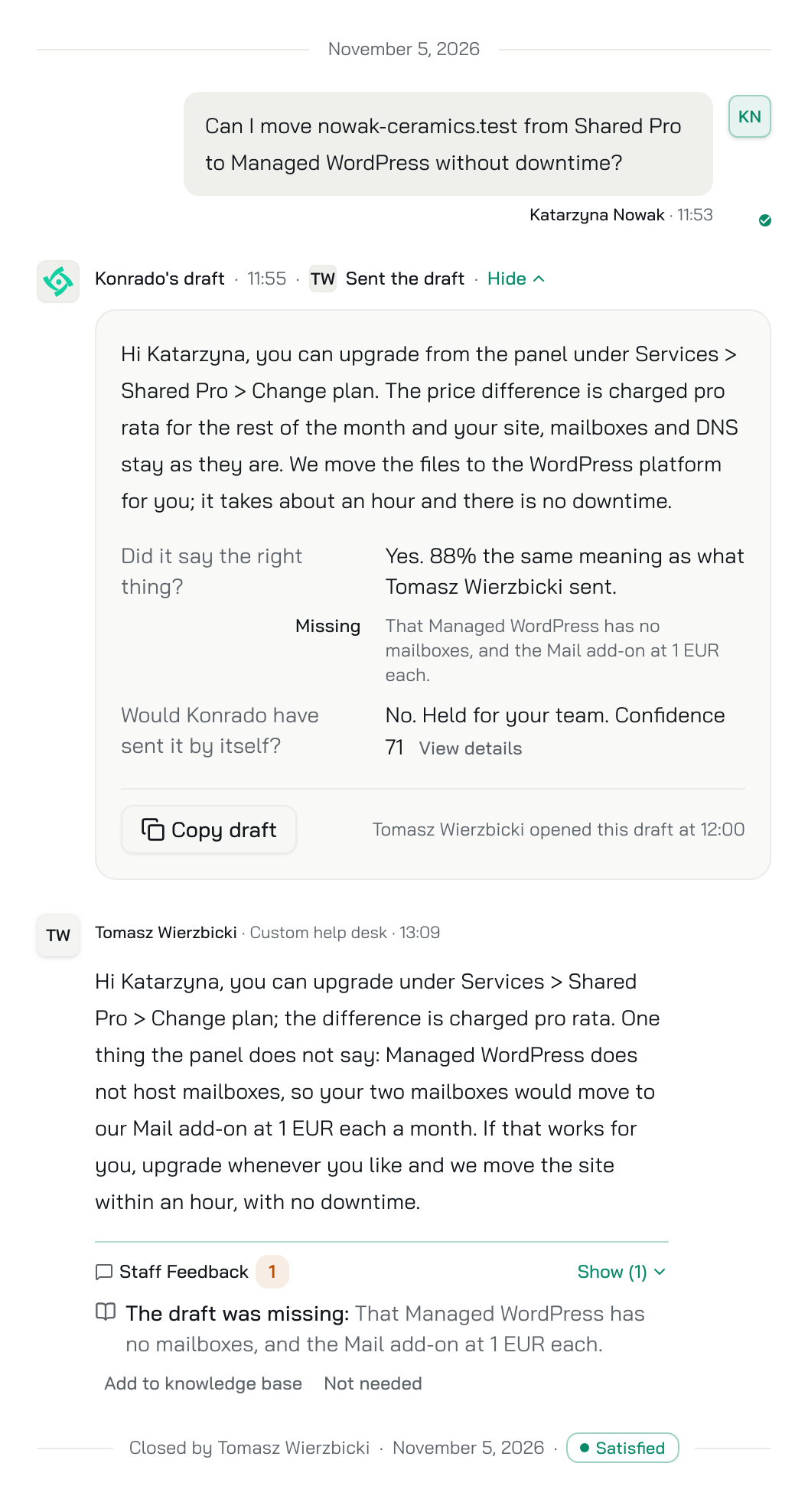
One ticket from Larkmoor Hosting, the demo company we fill with invented data, shows why that person matters. A customer asks to move a site from Shared Pro to Managed WordPress without downtime. The draft gets the path in the panel and the pro rata charge right, and says the mailboxes stay as they are. They do not: Managed WordPress has no mailboxes. The team fixes that one line before sending, and clicks the button under the reply that adds the missing fact to the knowledge base. The customer never sees the wrong promise, and Konrado has the fact for the next ticket like it.
Weeks two to four: watch what the AI would have sent
Switch Auto replies to Shadow when someone on your team will read its record each week. Konrado then decides on every new ticket as if it were Live, sends nothing, and records what it would have sent. Shadow costs nothing extra. Read the Would have sent rows as if the customer had received them: a wrong one is a rule or an instruction to fix before Live. If nobody has time for that yet, keep Off. The drafts your team changes are still in the Inbox, and they tell you the same thing more slowly.

What a team gets once the AI answers on its own
When the changes your team makes get rare, go Live: a reply above your confidence bar goes out on its own, and everything else stays a draft for a person. Refunds, cancellations and any topic you list stay with people whatever the score, and so does a ticket where someone has to act, such as a plan change.
Gigacore, an international hosting provider, cut its average first-response time from 16 hours to 30 minutes and had 70% fewer first-line tickets that needed a person. The Hosting Heroes, a UK provider, say the automatic reply feature “has significantly reduced the volume of routine Level 1 tickets our team has to handle manually”.
Before you connect
The clicks are in the Connect WHMCS guide, and the setup takes about 10 minutes. Settle these first:
- Connect the WHMCS your customers write to, not a test install. A test install has no real tickets, so its drafts prove little.
- You need WHMCS 8.0 or newer with PHP 7.4 or newer. If a firewall protects WHMCS, allow Konrado’s IP addresses.
- Keep the connection key private, like a password. It never expires.
- Choose which departments Konrado reads, in Workspace Settings › Integrations. The same choice applies to drafts and Auto replies.
- In the Knowledge Base, click Sync now on Resolved tickets, so Konrado learns from up to 1,000 of the tickets your team already closed.
- Ask every team member to install the browser extension and sign in with their console account. That is where they see the drafts.
If a security review comes first
If your security team must review Konrado before it touches your live WHMCS, start the review with the Security and data page and the security note on the WHMCS page. Konrado reads your products, invoices, services and clients, and changes stay in your WHMCS admin. Until the review ends, a test install can show that the connection works. Its drafts prove little, because it has no real tickets.
What to do now
Connect your live WHMCS with the Connect WHMCS guide and ask your team to install the extension. Keep Auto replies Off, or choose Shadow, and read the drafts your team changes each week in the Inbox. Fix what they show, then go from Shadow to Live.
Start free at https://app.konrado.ai/en/sign-up. No credit card required.
Written with Konrado’s AI.