Early in the morning a ticket arrives: “My website is down.” Nothing else. Before anyone replies, someone finds the account and opens the panel to check the server, the domain and the invoices. AI auto replies for hosting tickets can make that check for you, once your server panel is connected.
Konrado then reads the account behind the ticket before it answers. Without the panel, a reply to “my website is down” can only guess at the cause. Connect the panel first, then turn on auto replies. The diagram shows where a ticket like that goes when Konrado needs the server to answer it.
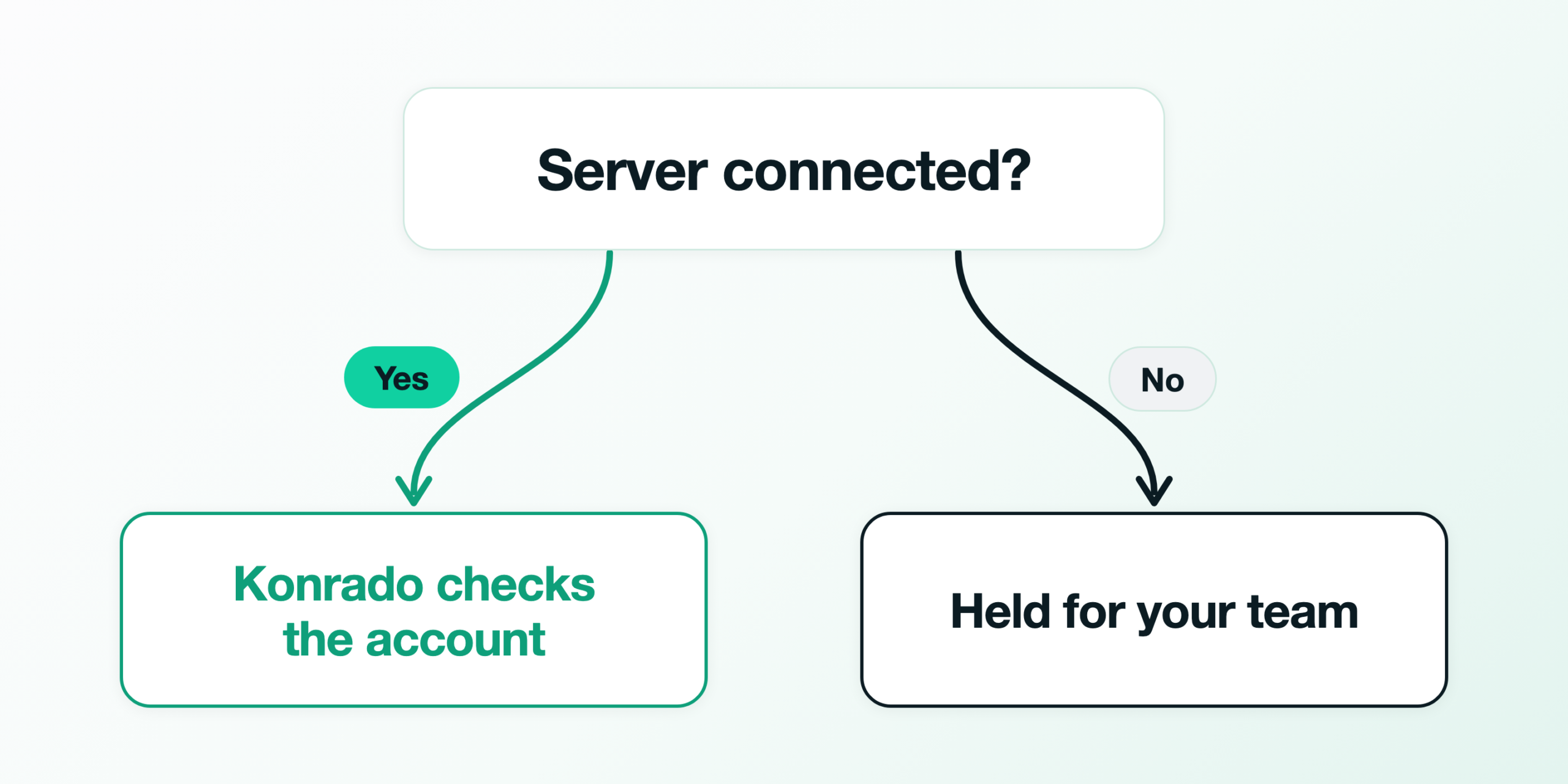
From 1 August to 31 October 2026, auto replies across our customers’ help desks held back 866 of the 17,716 messages they saw. The count only shows messages where Konrado judged that answering needed server access, and no server integration was connected. That is about 1 message in 20 that waited for a person with the account still unchecked.
Week one: the servers behind your site-down tickets
Start with the servers your site-down tickets come from, once WHMCS is connected. Konrado begins at the customer’s service in WHMCS. It finds the server that service sits on, by hostname or IP address, and reads only that account. So that server needs the same hostname or IP as the panel address you enter. Konrado changes nothing on the servers it reads.
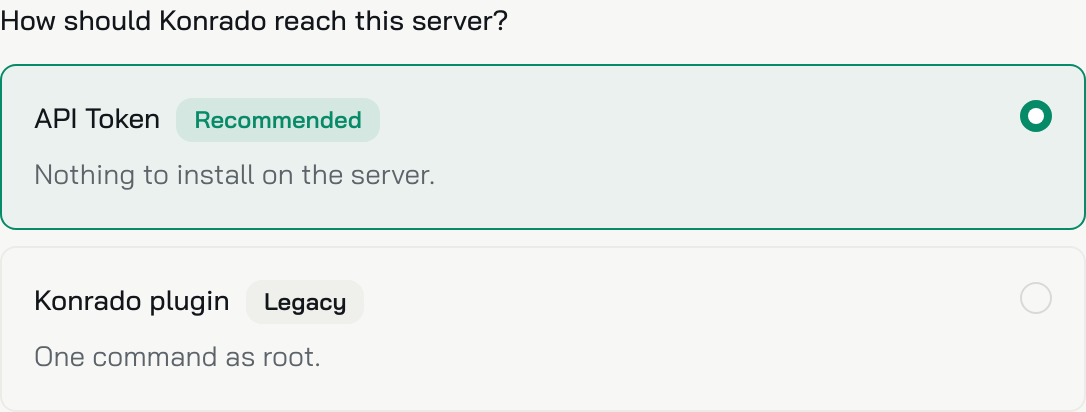
When you add a server, the console asks how Konrado should reach it and picks the API token first. Keep that for a new server. You create a token or key in the panel, and nothing gets installed. The choice sits at the top of the form, with API Token marked Recommended.
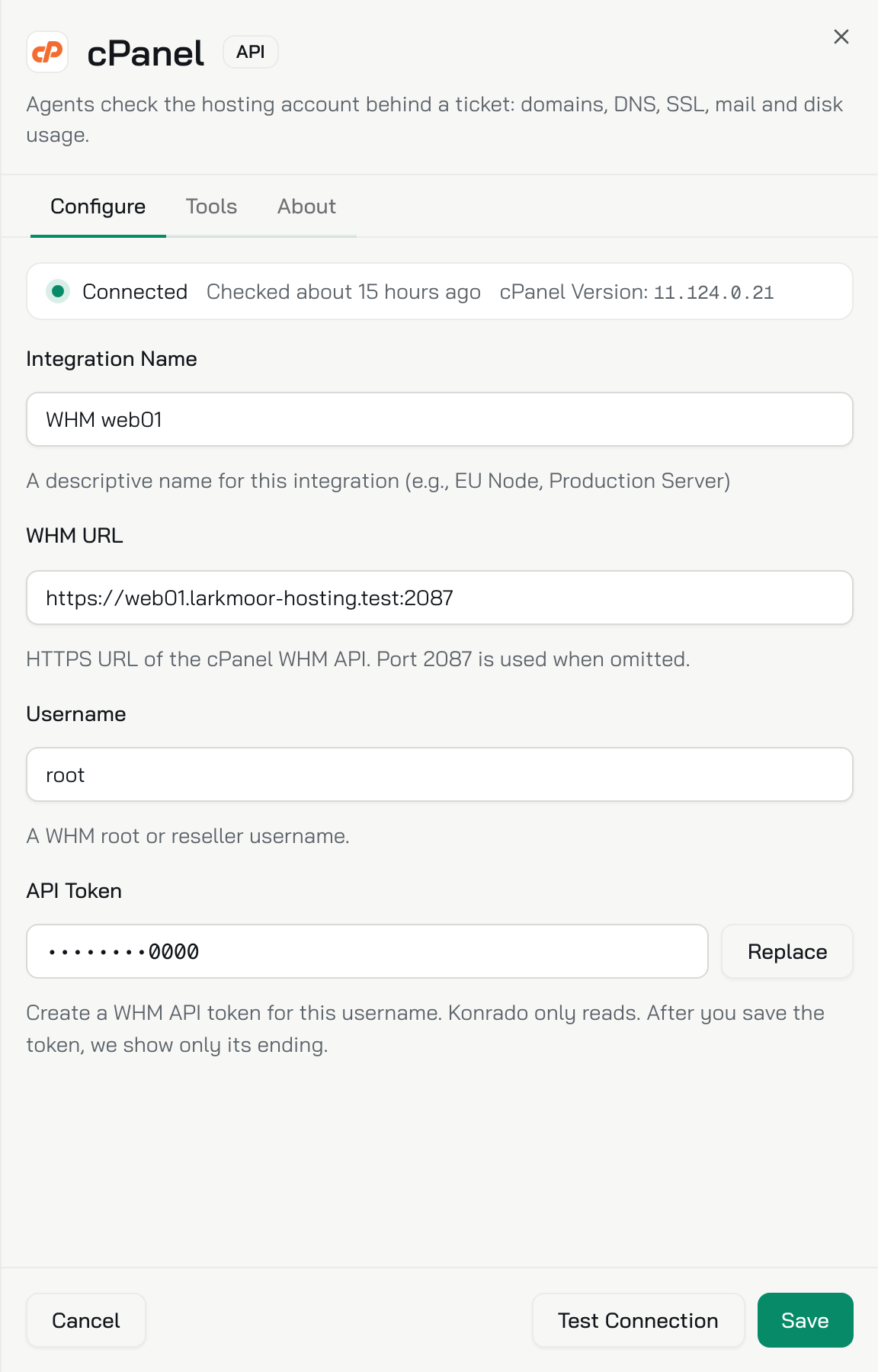
Fill in the panel’s address and the token, and run Test Connection before you connect. These screens come from Larkmoor Hosting, a demo host we made up, so its customers and domains are invented. Once connected, Larkmoor’s cPanel server opens in this edit view, with Connected at the top and the token shown only by its ending.
A Shadow week shows where a server is missing
A week in Shadow shows which tickets needed a server you have not connected. In Shadow, Konrado decides on every new ticket and records what it would have done, and nothing reaches a customer. On the Status tab of Auto replies, pick Shadow, and the banner reads “Shadow mode: nothing is sent.”

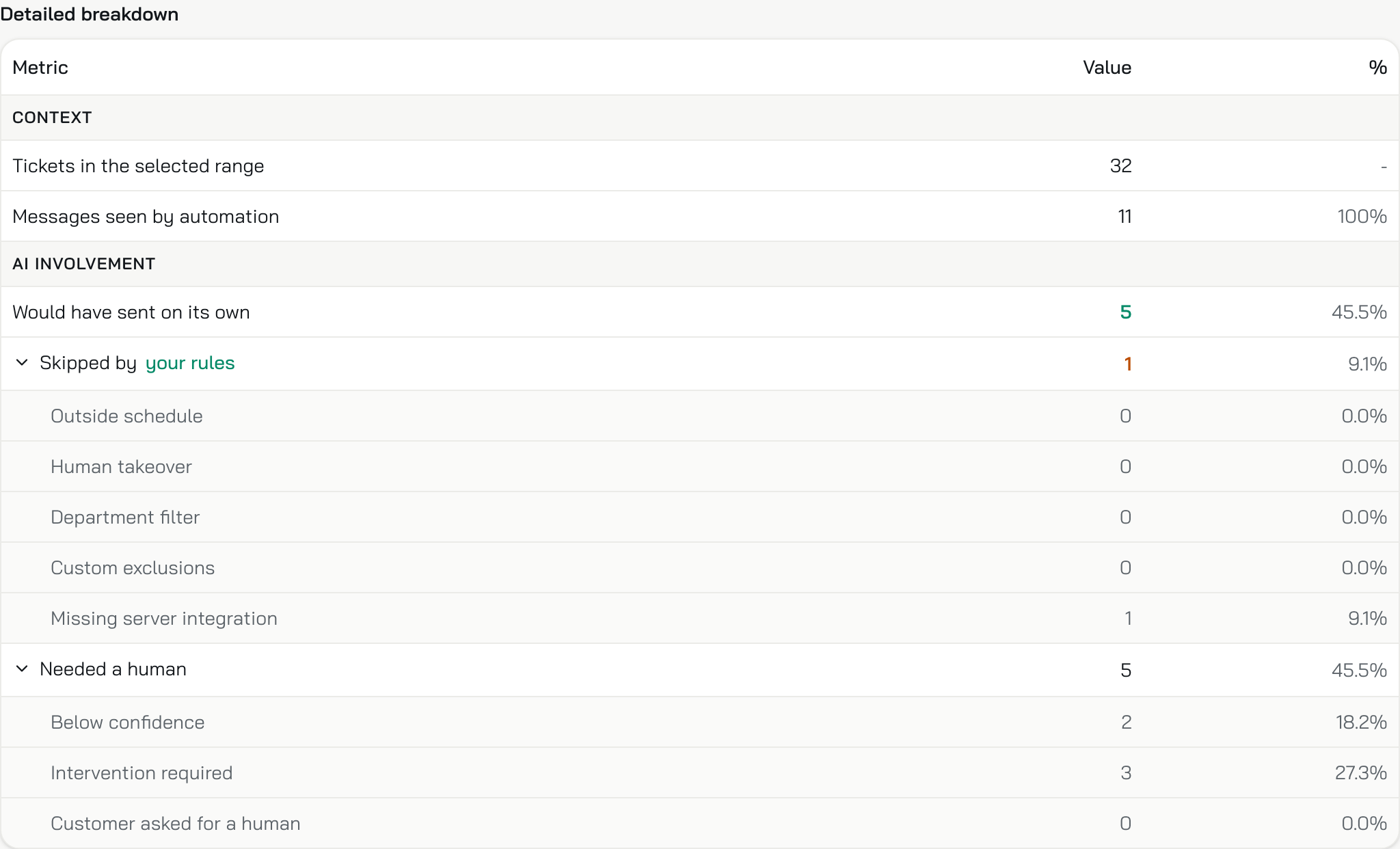
At the end of the week, open the Automation report under the banner. In its Detailed breakdown, the messages held for a missing server have their own row, Missing server integration. Larkmoor’s report below has one message in that row.
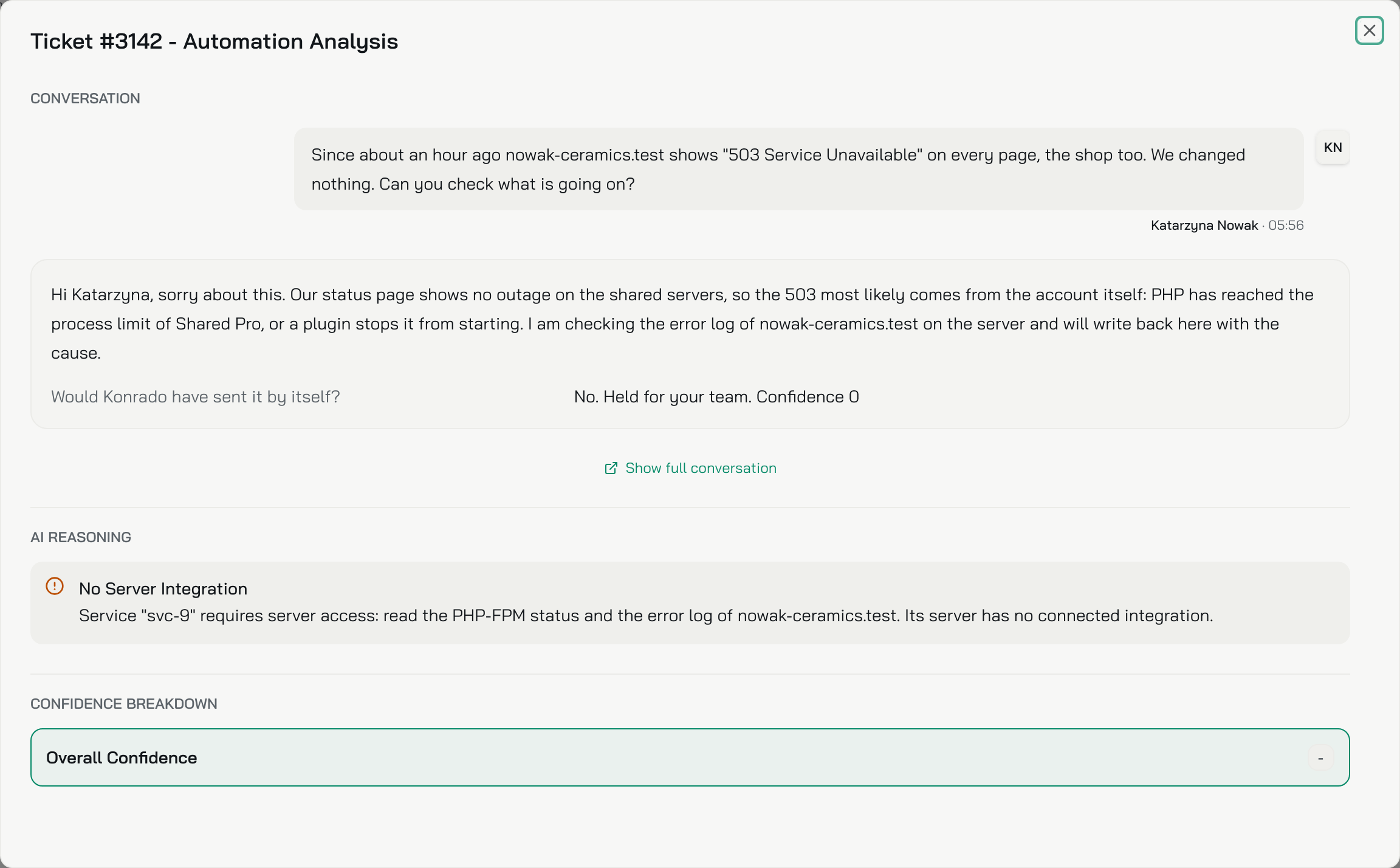
To see whose server is missing, switch to the Auto-reply history and click the held ticket’s row. At Larkmoor, it is a site-down ticket.
The customer writes that their site shows “503 Service Unavailable” on every page, the shop too, and that they changed nothing. Konrado’s draft guesses at the cause, a process limit or a plugin, and says it is checking the error log. The site’s server has no connected integration, so Konrado held the ticket for your team. The row opens on that conversation, the held draft and the reason.
Connect that server the way you did in week one. The next site-down ticket from it starts with the account, which on cPanel means its plan, limits, domains, DNS records and SSL details.
Once replies go out
When the Shadow week reads well, switch to Live. Konrado still checks the account first. It sends a reply on its own only when it is sure enough, and the rest wait as drafts for your team. A customer with a suspended account can then get a first answer that names the unpaid invoice behind it. When the A record points away from your server, the answer can say so.
The Hosting Heroes, a UK host, uses Konrado’s auto replies, and our web hosting page quotes its Managing Director, Chris Danks. He says the automatic reply feature “has significantly reduced the volume of routine Level 1 tickets our team has to handle manually.”
Tickets that need hands-on work still reach your team, with the account details gathered and next steps suggested.
When the cause is off your servers
Some problems start where Konrado cannot look: at the registrar, a CDN or another mail host. The panel does not show them, so a ticket about one still needs its own check.
If most of your customers’ sites run on servers you do not manage, connecting first does not fit you. That is the case when you sell domains only or resell another company’s platform. With no panel to connect, a ticket that needs server access waits for a person. Answer those yourself. Auto replies can still take the common billing and setup questions.
What to do now
Open last month’s site-down tickets and note which servers they came from. Connect WHMCS if it is not connected yet, then add those servers first with the server integrations guide. Run auto replies in Shadow for a week, and connect any server the held tickets point to before you go Live.