A refund request comes in, and each person on your team would handle it a different way. A plan change waits until someone makes it in the billing system. You want both handled the same way every time, and you can get there with support ticket procedures for those requests alone.
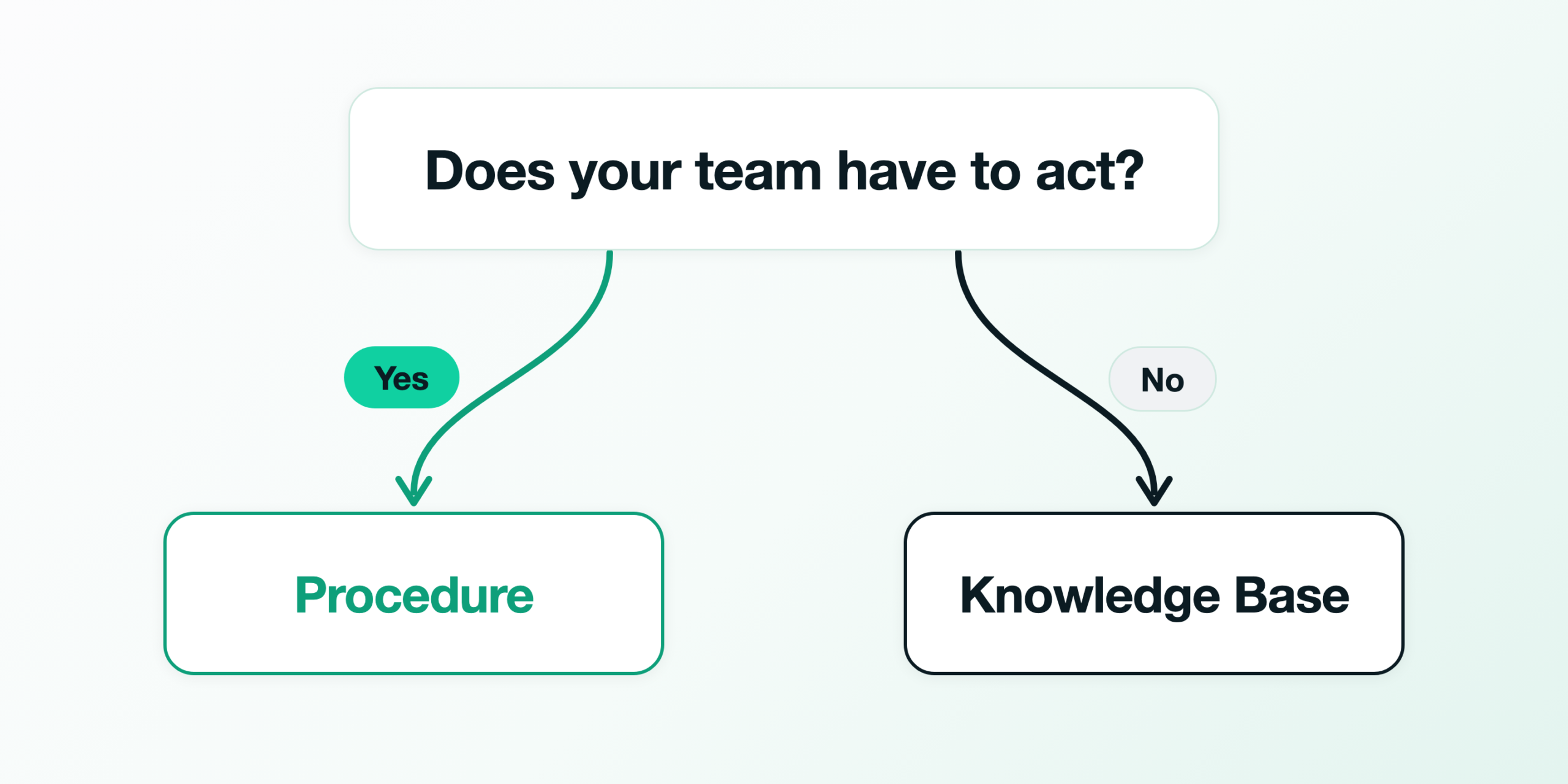
Write a procedure only for the requests someone on your team has to act on, like a refund or a plan change. Leave the questions to the knowledge base. Konrado reads WHMCS and your panels, but a change to an invoice, a service or a client stays in your admin. Those requests end with a person, so the steps you write go into Konrado’s draft for that person.
Sort the kinds of request in your queue with the question in this diagram.
Your first week shows which requests need steps
A week of auto-reply decisions marks the requests your team acts on, because one possible outcome of a decision is Intervention required. It means the reply needs a person to act. Of the 7,209 ticket messages Konrado’s auto replies judged from 1 August to 31 October 2026, 3,812 needed a person to act, about half.
Your own list needs a week of tickets in Shadow or Live, and Shadow sends nothing to customers. It records what Live would have done; if yours are still Off, the auto replies guide shows how to start it. After that week, open the Auto-reply history and filter it by Intervention required.
Larkmoor Hosting, the company on these screens, exists only as demo data, and its plans, prices, people and customers are invented. Its history, filtered that way, shows a refund, a VPS downgrade and a cancellation.
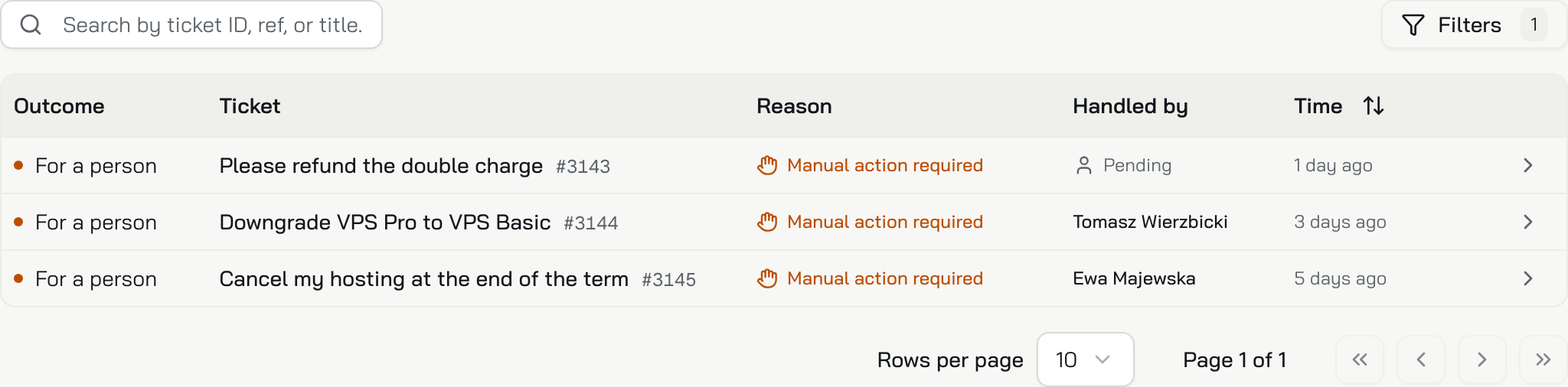
Then group your own rows by request, and write the first procedure for the one that comes back most often.
Agree on the steps before anyone writes them
Before anyone types a step, agree with the people who handle that request on how it is done. What you write there goes into the reply on every matching ticket, as written and in order.
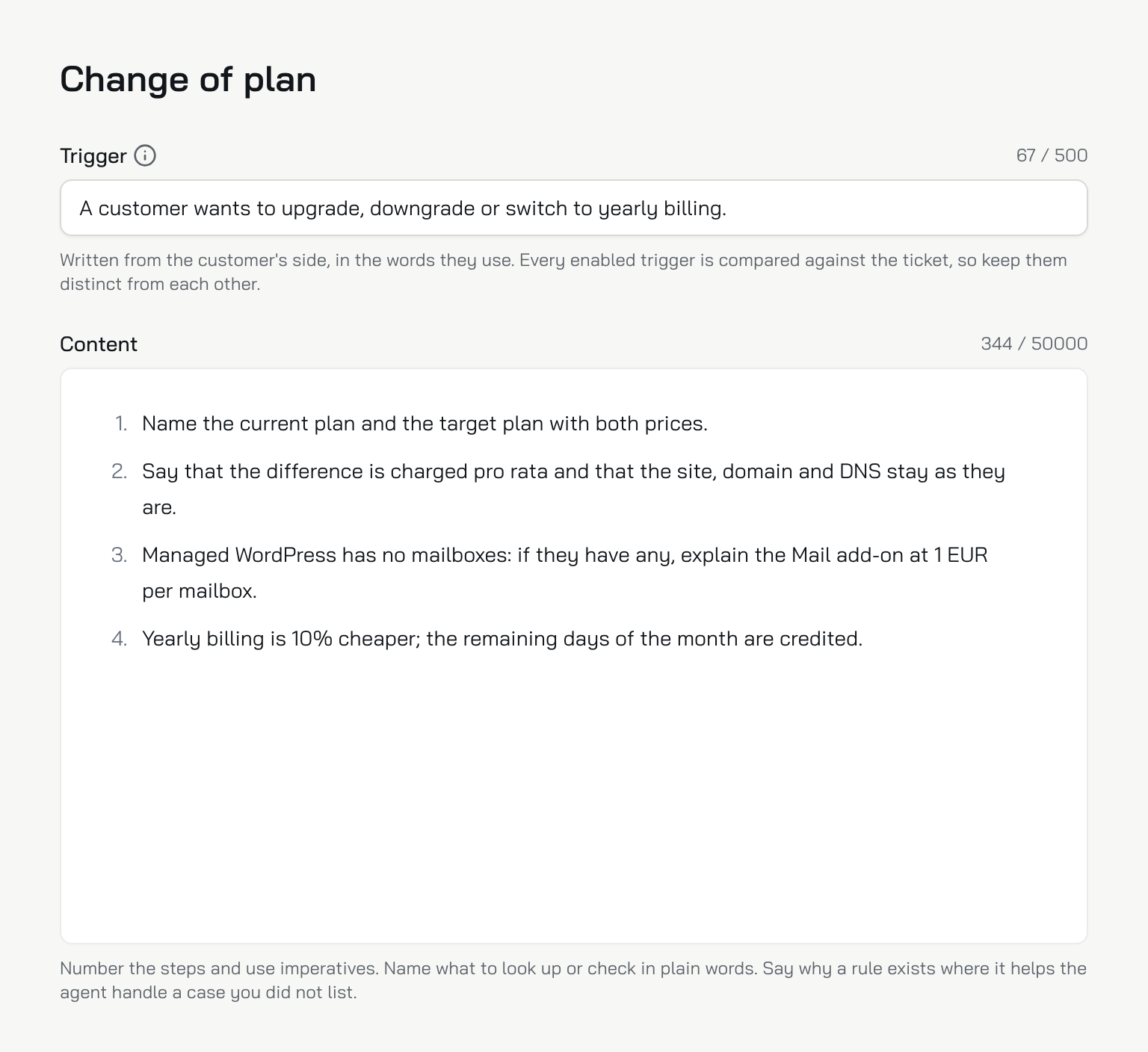
Larkmoor’s procedure for plan changes, Change of plan, is one trigger sentence written from the customer’s side and four numbered steps, shown here in the editor.
With no procedures yet, the page offers a Refund example. It opens switched off with its trigger and steps filled in, so change them to what your team agreed, then switch Enabled on.
If your team already handles a request the same way every time, Konrado can find it for you. Suggest from tickets reads up to 1,000 of your newest closed tickets and proposes the procedures your team follows. Its switch Add suggestions to my procedures right away is on by default. On, the suggestions become your procedures at once, enabled, and the agent follows them on new tickets. Switch it off before you click Start, as Larkmoor did in this dialog.
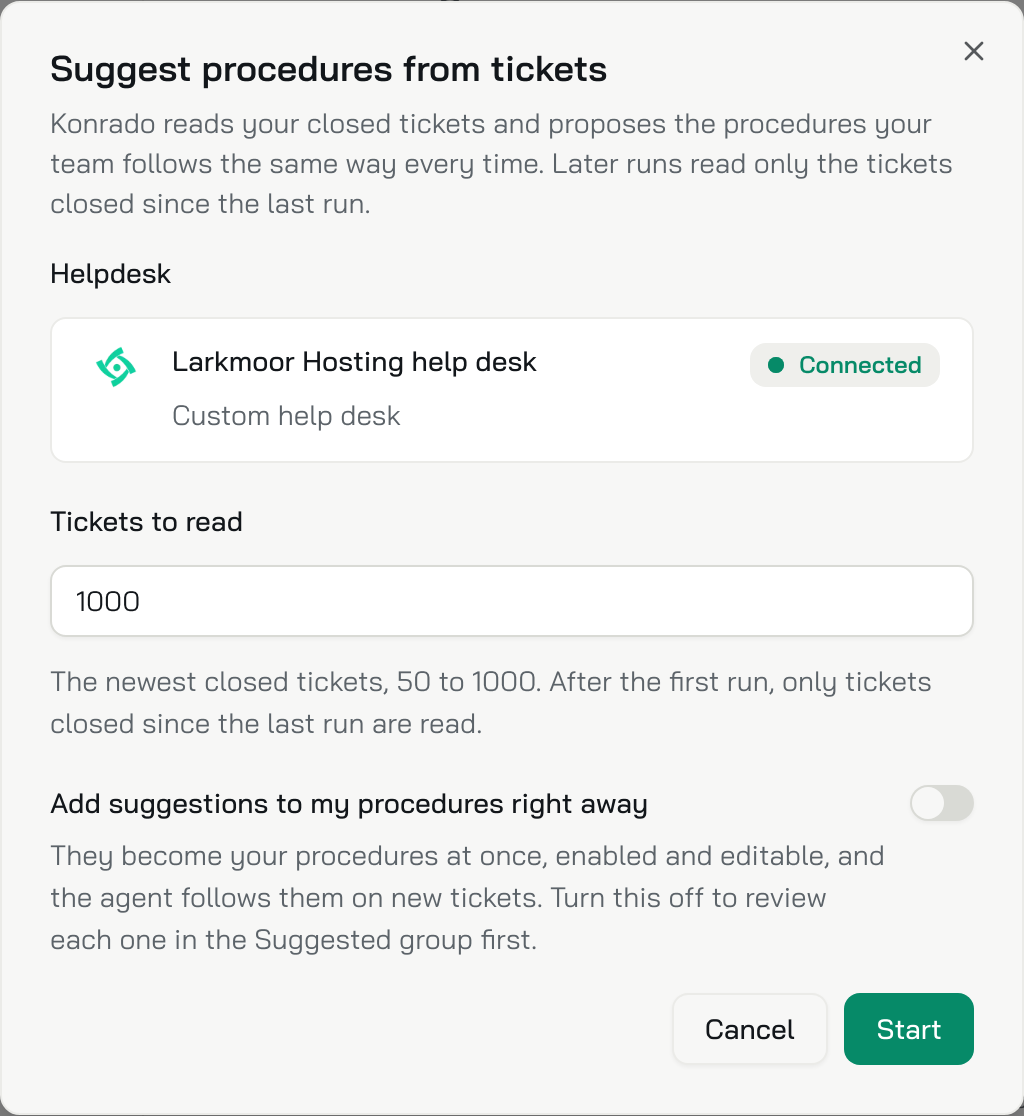
Accept the ones for requests a person acts on, and dismiss any that only answers a question. Konrado never suggests a dismissed one again.
A plan change, from the customer’s question to the sent reply
Then a Larkmoor customer writes in about moving their site from Shared Pro to Managed WordPress, and asks what changes and what it costs. It reads as two questions, and behind them is a plan change that someone has to make.
When someone on the team opens the ticket, Konrado’s draft is already there. A line above it reads “Used the Change of plan procedure”. The draft gives both plans with their prices and says the difference is charged pro rata. It warns that Managed WordPress has no mailboxes, then ends with “Shall I start the move?”
The ticket below shows that draft above the reply the team sent.
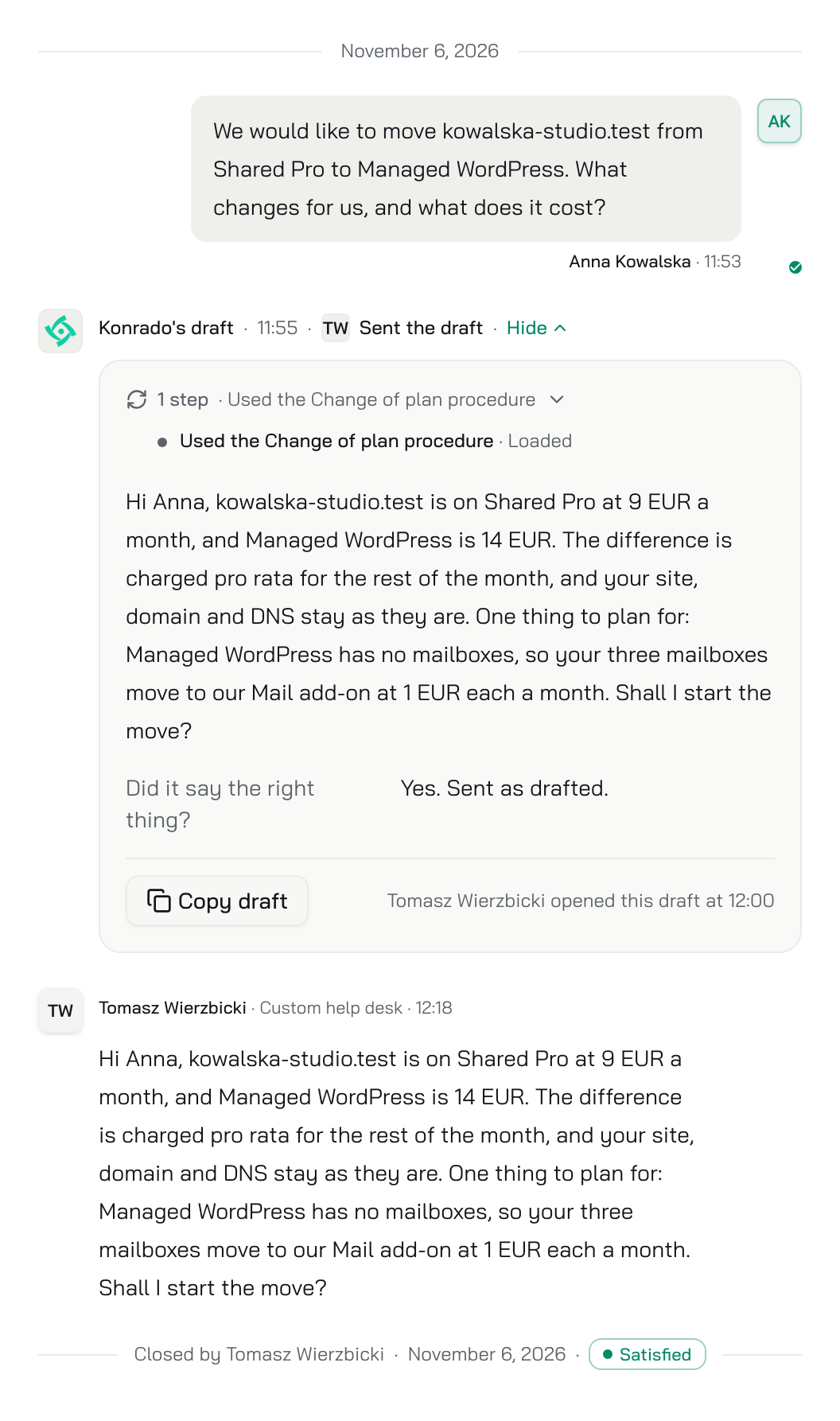
When the customer says yes, a person makes the move in the admin. The next plan change that matches gets the same steps in the same order, whoever opens it.
The INBS.Software case study reports more consistent replies for ModulesGarden, PanelAlpha and EasyDCIM, which belong to INBS.Software, the same group as Konrado.AI. For Q3 2025, with Konrado as a whole, it says: “Replies became 37% faster and more consistent.”
Questions go to the knowledge base, answered once
A customer who asks “Do you move my website for free?” needs an answer of one or two sentences. That belongs in one Q&A entry. In Larkmoor’s knowledge base it is the Free migrations entry, with three ways customers ask and one answer under them.
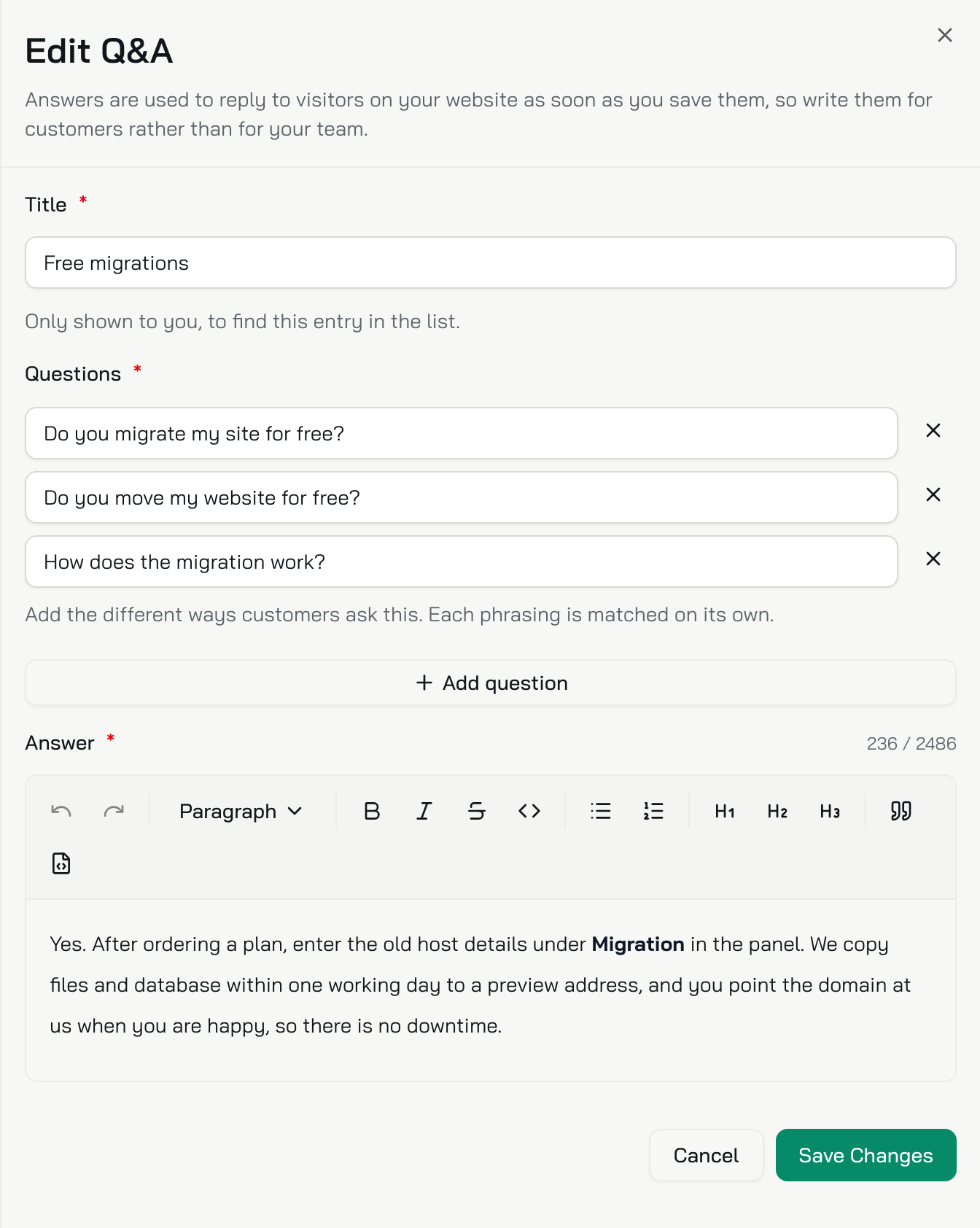
Your team writes that answer once. Keeping questions out also keeps your list of procedures short. On each ticket, Konrado compares the customer’s latest message with the name and trigger of every enabled procedure. When the wrong one matches, its steps go into the reply as written.
If the filter finds almost nothing
If the filter shows only a few rows a month, this rule does not fit your team yet. Those few drafts wait for a person anyway, and whoever answers can fix one before sending it. Spend the time on the knowledge base, where your questions are.
Suggest from tickets may propose no refund procedure for a team that still handles refunds in different ways. It keeps a pattern only when tickets show the same request handled the same way, so agree on the steps and write them up yourself.
When a draft names a procedure that does not fit its ticket, narrow that trigger, or switch Enabled off while you fix it. Off, Konrado keeps it and ignores it.
What to do now
If auto replies are Off, start Shadow with the auto replies guide and give it a week. Then filter the Auto-reply history by Intervention required and take the biggest group. Agree on its steps with the people who handle it, and write it as the Procedures page describes. After that, a draft with the right facts and the wrong steps calls for a procedure. For a wrong fact, the Knowledge Base guide shows what to change.
Start free at https://app.konrado.ai/en/sign-up. No credit card required.
Written with Konrado’s AI.